Skip to content
  • News
  • Live
  • First Alert Weather
  • Video
  • Sports
  • Streaming Schedule
  • Seen On TV
  • Closings
  • Podcasts
  • Home
    • Watch Live
    • Seen On TV
    • Contests
    • Submit Photos & Video
    • Sign Up For Our Newsletter
  • News
    • Download News App
    • Crime
    • Building a Better Cleveland
    • Cuyahoga's Most Wanted
    • National
  • Video
    • Download Streaming Apps
    • Live Newscasts
    • Streaming Schedule
    • Latest News Videos
    • 19 News This Morning
    • 19 News Now
    • 19/43 Video Vault
    • Drone 19
  • 19 Investigates
    • Contact 19 Investigates
    • 19 Solutions Team
    • 19 Troubleshooters
    • Seeking Justice
    • Unidentified
    • The Missing
    • To Catch a Killer
    • InvestigateTV
  • Podcasts
    • Dark Side of the Land Podcast
    • Off the Leash Podcast
    • 19 to Go Podcast
    • The LANDline Podcast
    • 19 Newsmakers Podcast
    • The Watchdog Podcast
    • Stadium Spotlight Podcast
  • First Alert Weather
    • Radar
    • Closings
    • Download Weather App
    • 19 First Alert Weather Now
    • First Alert Camera Network
    • 19 First Alert Safety Guide
    • First Alert Science School
  • First Alert Focus
    • Wild Weather
    • Planning Calendar
  • Traffic
  • Sports
    • Cleveland Browns
    • Cleveland Cavaliers
    • Cleveland Guardians
    • Cleveland Monsters
    • Cleveland WNBA
    • Ohio State
    • Tailgate 19
    • Friday Football Frenzy
    • Off the Leash Podcast
    • Stadium Spotlight Podcast
    • Futbol Frenzy
  • Health
    • Vaccine
    • Health Updates
    • Go Red
    • Breast Cancer
    • Spot the Signs
  • Consumer
    • Scam Squad
    • The Watchdog Podcast
    • Aging Untold
  • Food
    • Cleveland Cooks
    • Taste Buds
  • Community
    • We the People
    • Pawcast
    • Operation Backpack
    • Share Your Holidays
    • CLE Weekend
    • 43 Focus
    • Submit Photos & Video
    • Cleveland Now
    • Sponsor Spotlight
    • Memorials
  • Programming Schedule
    • Cleveland's 43
    • Report a Service Outage
  • About Us
    • Contact Us
    • Meet the Team
    • Request an Emcee
    • Internships
    • Careers
  • InvestigateTV
  • Watching Your Wallet
  • Local News Live
  • NextGen TV
  • Circle Country
  • PowerNation
  • Digital Marketing
  • Gray AI Policy

Click the buttons below to download PDF versions of the instructions on this page.

Video Tutorials

If you have questions about closings, email: schoolclosings@woio.com

Setting Up Your Closings Admin Account

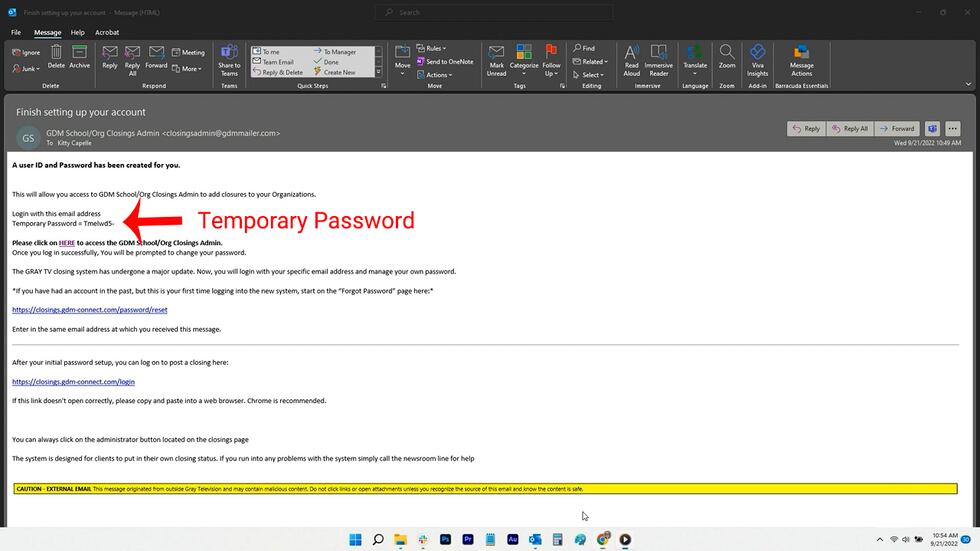
For new accounts, you should have received an email that looks like this:
Gray Closings

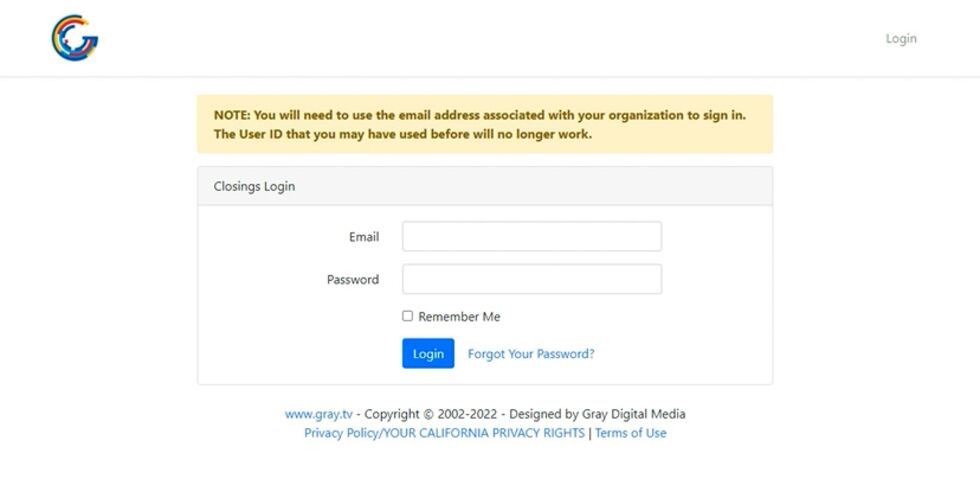
Copy the temporary password from the email and click on the HERE link in the email to access the GDM School/Org Closings system. It will take you to the below page where you will enter the email address where you received instructions and the temporary password you were given.
Gray Closings

On the next page, you’ll be instructed to reset that temporary password:

Gray Closings

Your new password must have:

  • A minimum of eight characters
  • At least one capital letter
  • At least one number
  • At least one special character

Resetting Your Closings Admin Account Password

You can reset your password easily through the original email you received when you set up your account or by clicking the Forgot Password button on the login screen.

Gray Closings
Gray Closings

Entering and Managing Closings

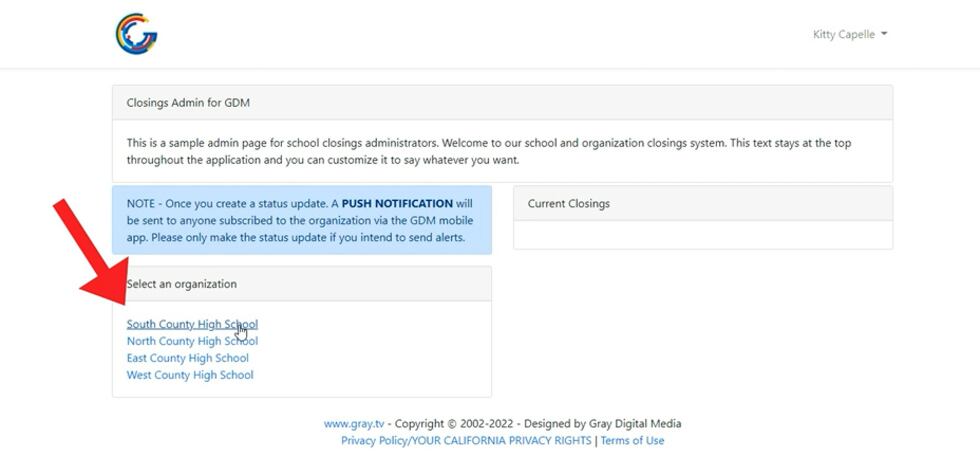
Once you’re signed in, you’ll be able to manage the closings status of your school(s) or organization(s).

Start by choosing the organization from the list.
Gray Closings

The next page should look similar to this:

Gray Closings

Use the top checkbox if your organization’s status is due to COVID.

You’ll want to set the first dropdown to set your organization’s status.

Gray Closings

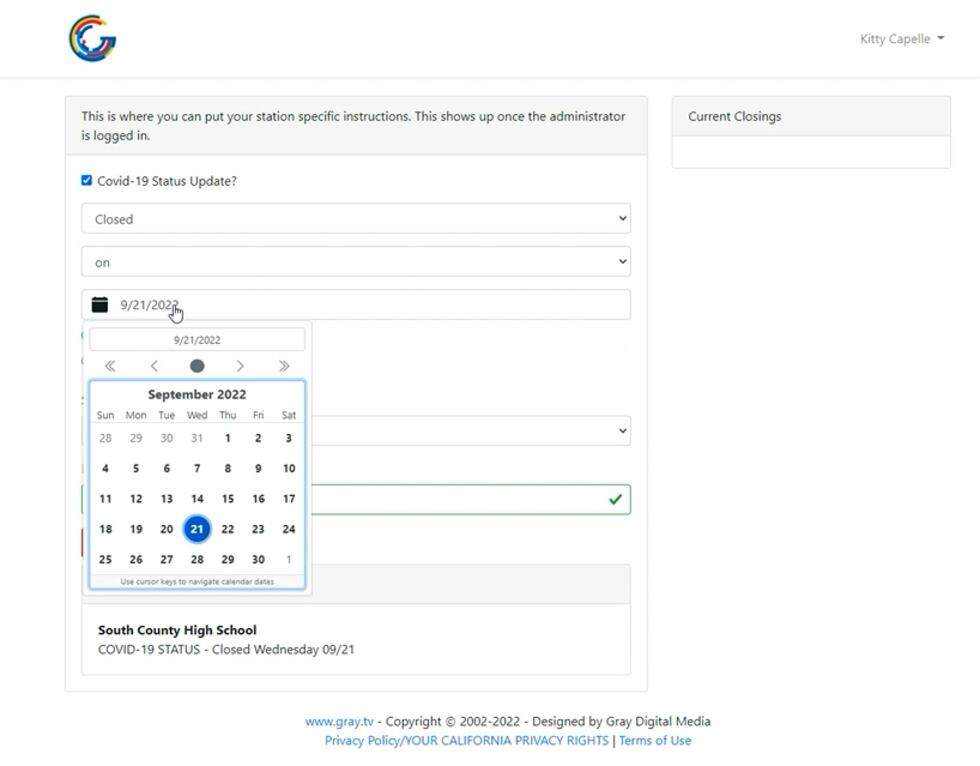
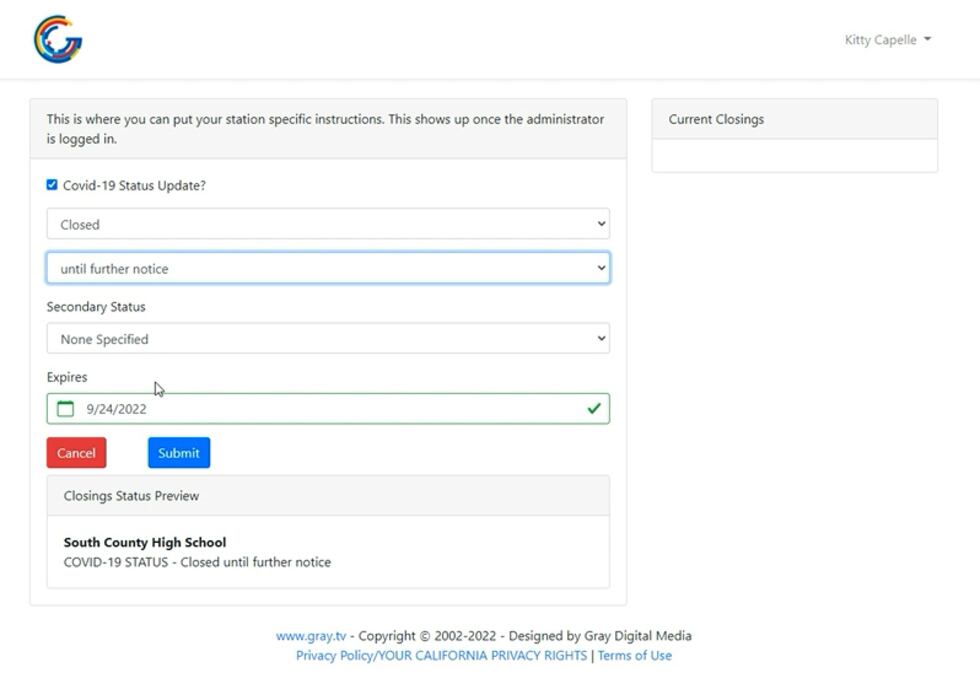
Next, pick a date for the closing.

Gray Closings

If your closing is for a future date, choose “on” from the dropdown menu, then choose a date from the calendar.
Gray Closings

If your closing is for several days, choose “Through” from the dropdown menu, then select the end date from the calendar.

Gray Closings

If you aren’t sure how long you’ll need to set your organization’s status, select “until further notice” from the dropdown menu.
Gray Closings

You’ll be able to preview your closings status in the box below the submit button:

Gray Closings

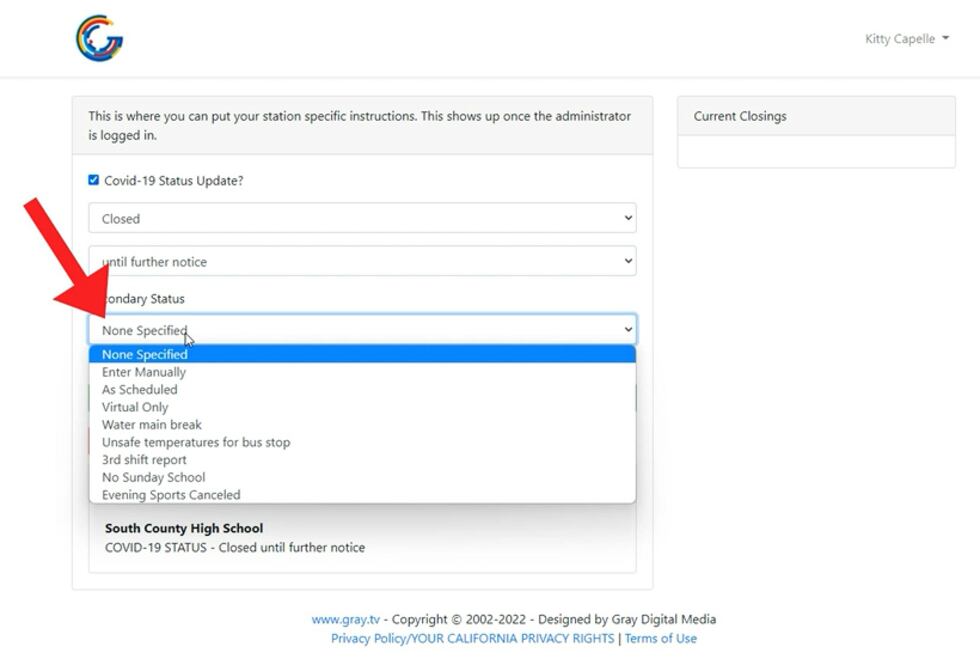
You’ll also have the option to choose a secondary status. This list can help provide additional information about your organization’s status. Note: The options you see in the image below may not match what you see when you’re logged in.
Gray Closings

Some locations will have the option to enter a unique secondary status.

Gray Closings

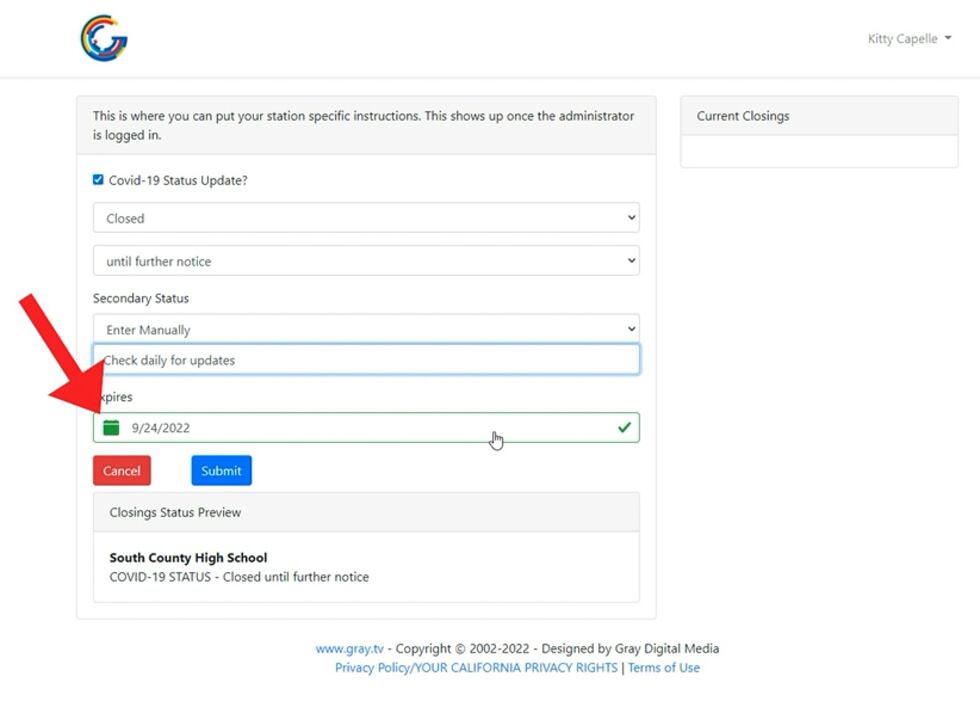
You’ll need to set a date for the status to disappear. If you choose Today or Tomorrow, this date will be generated automatically. Otherwise, you’ll need to choose a date from the calendar.
Gray Closings

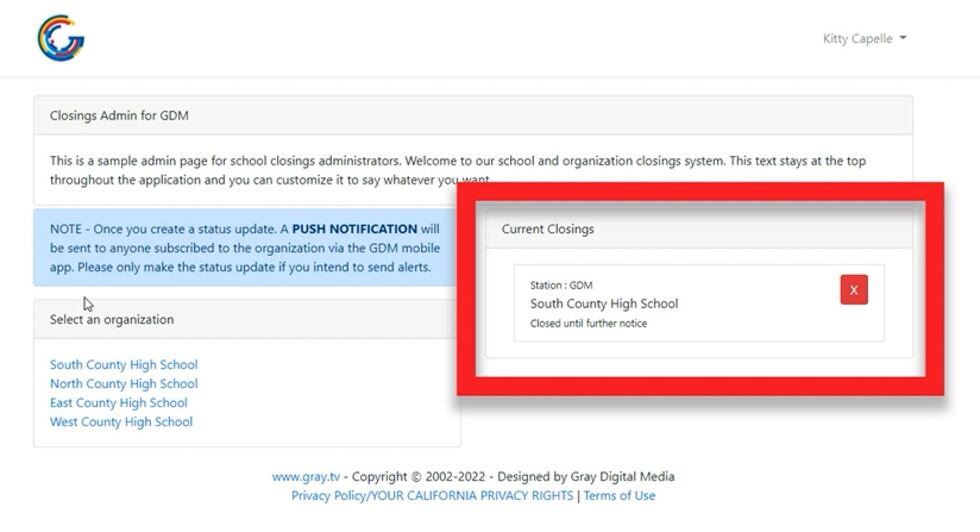
Once you click on the blue Submit button, you’ll be taken to this page where you can see your current closings status on the right:

Gray Closings

Click the red Back button to return to the home screen.

On the home screen, you’ll see the status of your organization on the right. If you manage more than one organization, you will need to enter the status for each individually.
Gray Closings

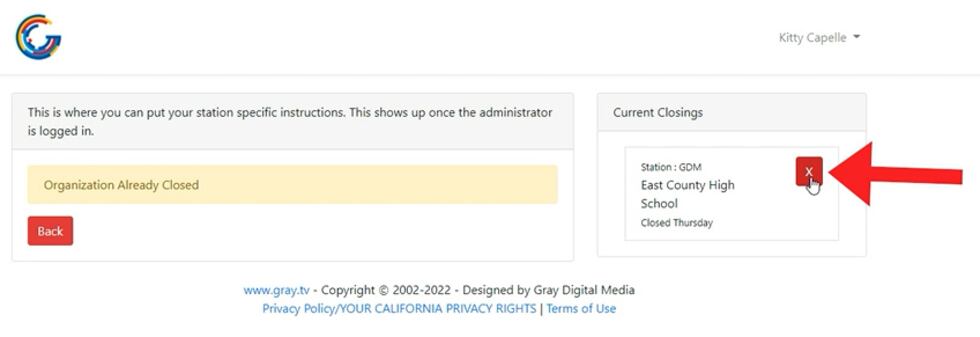
To update a status, click on the organization name. You’ll need to first delete the organization’s existing status. Click the refresh button on your browser for the form to appear, then enter a new status.
Gray Closings

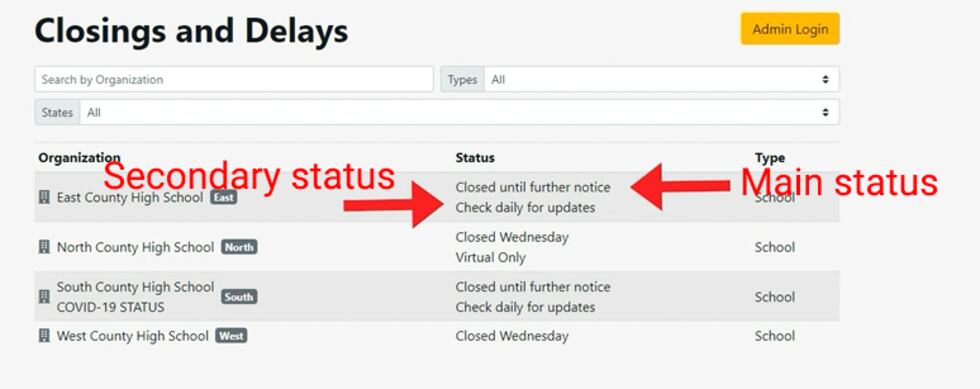
On the station’s website, this is how closings will appear:
Gray Closings
If you have questions about closings, email: schoolclosings@woio.com
Home
News
First Alert Weather
Sports
Traffic
Health
Food
Community
Contact Us
  • WOIO
  • 1717 E. 12th Street
  • Cleveland, OH 44114
  • (216) 771-1943
Public Inspection File
FCC Applications
publicfile@woio.com - (216) 367-7535
Terms of Service
Privacy Policy
EEO Report
Advertising
Digital Marketing
Closed Captioning/Audio Description Problems
Persons With Disabilities
Click here to learn more about our approach to artificial intelligence.
A Gray Local Media Station © 2002-2026